Instance Recovery in CryoSPARC v5
Discover the Instance Recovery feature introduced in CryoSPARC v5: how to recover a CryoSPARC instance if the database directory is corrupted or lost.
In the CryoSPARC v5 release, we introduced the new Instance Recovery feature, a major improvement to the ability to recover a CryoSPARC instance after corruption or loss of the CryoSPARC database.
Prior to the Instance Recovery feature, backing up and restoring the CryoSPARC database had to be manually configured by an administrator, could be a slow process, took a lot of disk space, and backups would become stale as soon as additional processing was done in any project. The new Instance Recovery system has many advantages:
- Instance Recovery creates a recovery file automatically every hour and this happens in all v5+ instances without any user setup needed.
- The recovery files are very small, and contain the full instance configuration information (users, compute lanes, profiles, etc.) but do not contain any project data. This means recovery files can be easily and routinely copied to one or more backup locations to also protect against disk failure.
- An instance can be fully recovered as long as a recent export is available, and project directories are intact. Recovery is fail-safe, meaning that if some project directories are inaccessible, all others will still be recovered and re-attached during recovery.
- Instance recovery is now the recommended way to provide resilience to database failure for CryoSPARC instances, and while the old backup and restore system still exists in v5, it is no longer recommended and may be deprecated in future versions.
In this blog post, we introduce the scenarios in which Instance Recovery can be useful, the prerequisites for using it, and the resources available to guide you through the process.
Corrupted or Lost Database: Not All Is Lost
As described in detail in the Guide, typical CryoSPARC Architecture and System setups can vary, from single or multiple workstations to cluster setups, allowing CryoSPARC to be installed and scaled flexibly. CryoSPARC follows the master-worker pattern, where processes are divided between master and worker processes, which can run on the same node if necessary.
The CryoSPARC database (a MongoDB instance) runs on the master node and collects all the information regarding the instance configuration, job images and plots, and Project/Workspace/Job metadata. The CryoSPARC database stores its contents on disk in a location that is specified when CryoSPARC is installed, typically on disks in the master node itself. Another copy of project and job metadata, images and plots are also stored on disk in the project directories, which are typically stored on a different filesystem.
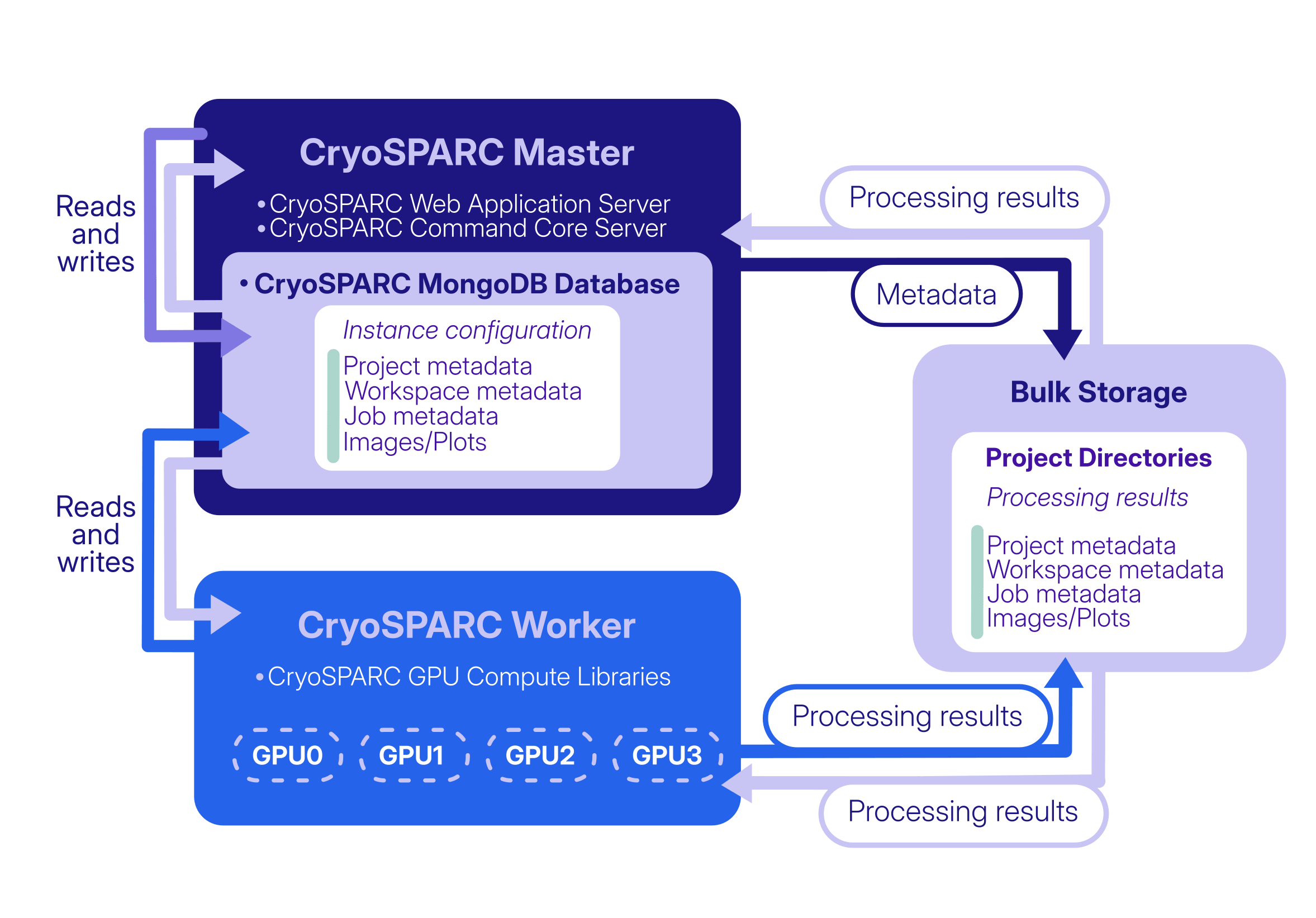
There are several scenarios in which the CryoSPARC database could be lost or damaged. For example, the database folder could be accidentally deleted, the database could run out of storage space while attempting to write to it, a power outage could occur during writing, or the underlying hardware could simply stop working.
If, for any reason, the database is no longer available, the CryoSPARC instance is affected: all other services depend on the database and subsequent attempts to start CryoSPARC will fail.
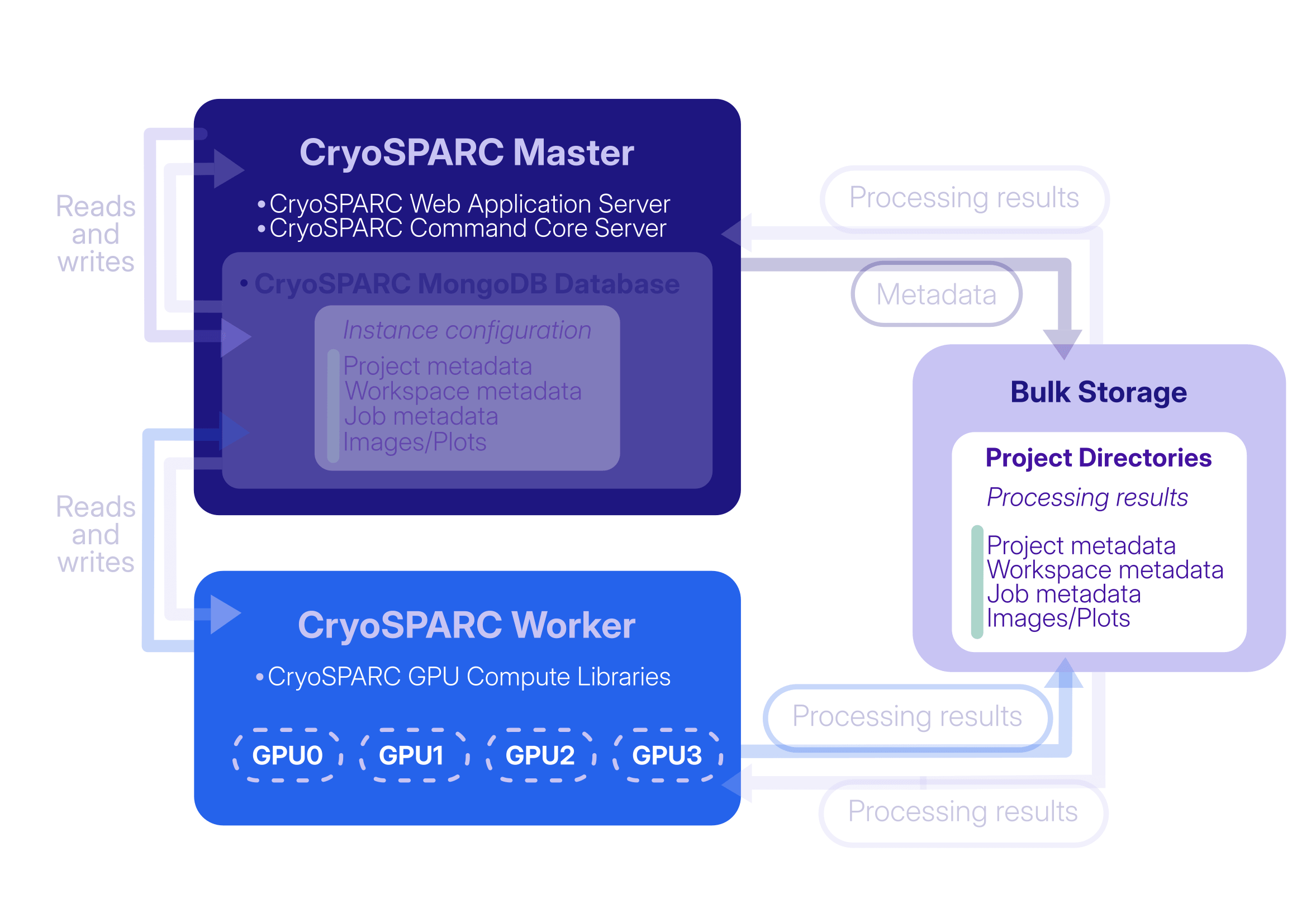
Before CryoSPARC v5, database loss or corruption could be addressed by maintaining complete backups of the CryoSPARC database using the cryosparcm backup and cryosparcm restore commands. These commands took a complete snapshot of the database, which was a very slow process that could require hundreds of GBs or more available disk space. The backup files would also become "stale", meaning that they would become out of sync with the project directories if any new jobs were created in any project after the backup was taken. Alternatively, an instance could be recovered by installing a new CryoSPARC instance, recreating users manually, reconnecting all worker nodes manually, and then manually reattaching the projects that were previously attached to the lost instance. This process could be time-consuming, particularly for instances containing a large number of projects, users, or lanes.
In CryoSPARC v5, this process is significantly simplified and is largely automated thanks to the new Instance Recovery feature.
Instance Recovery: When and How to Use It
CryoSPARC v5 automatically generates a recovery file (an instance configuration export file) once per hour and stores it in the cryosparc_master/run directory. This file tracks all instance configuration information (users, lanes, CryoSPARC Live profiles, etc.) and also which projects, workspaces, and jobs existed at the time of the latest export, but it does not store specific information about the jobs themselves, which is instead preserved in the project directories.
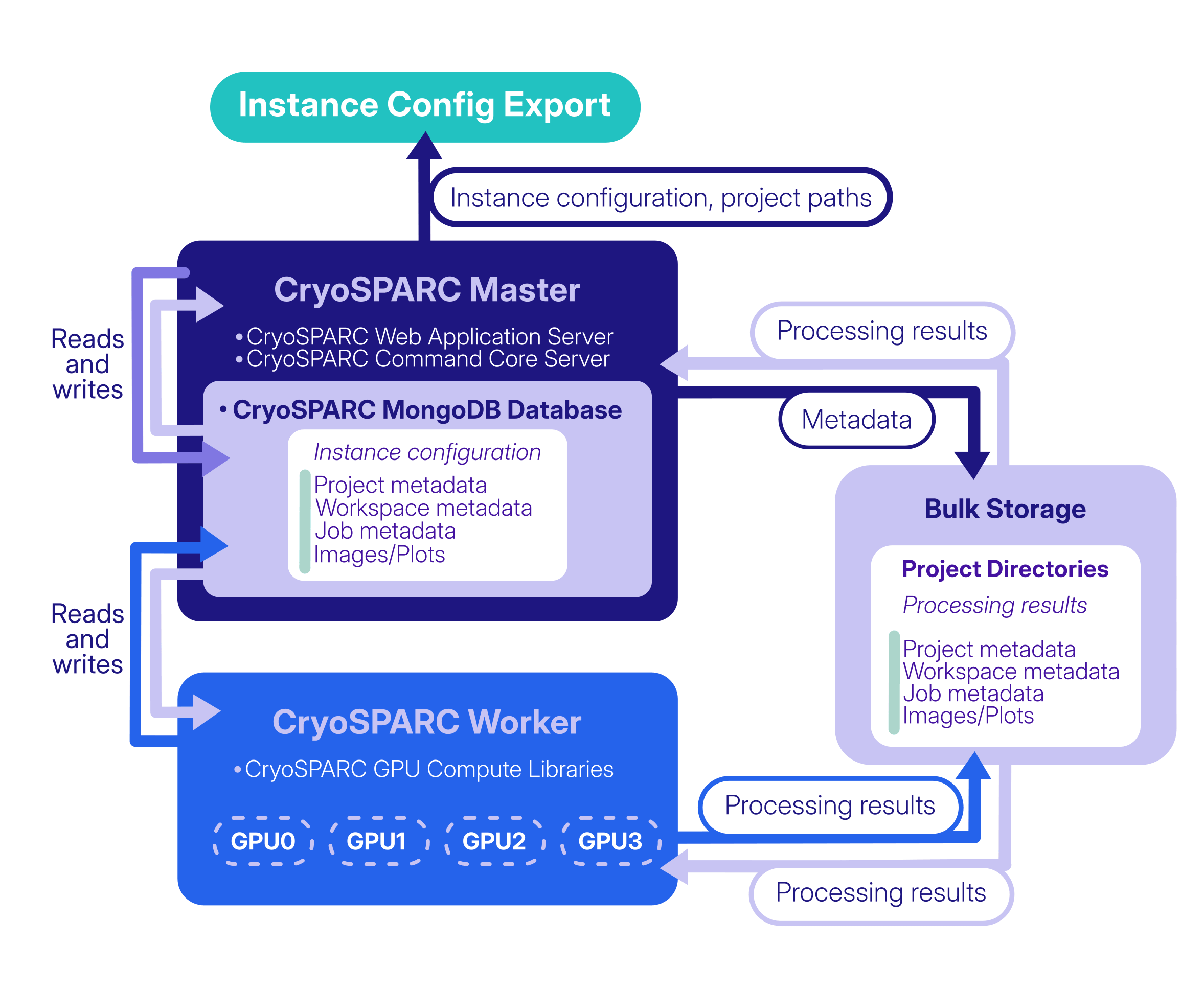
Together, the instance configuration export and the information stored in the project directories allow the instance to be recovered even if the database is completely lost, when the following prerequisites are met:
- The project directories are intact.
- A recent instance configuration export file is available (this would be found in the
cryosparc_master/rundirectory of the original instance). - Reliable storage, with enough space for the recovered database and future growth, is mounted and available on the CryoSPARC master node.
- The new destination
cryosparc_master/installation is running the same version as the original instance at the time of database loss.
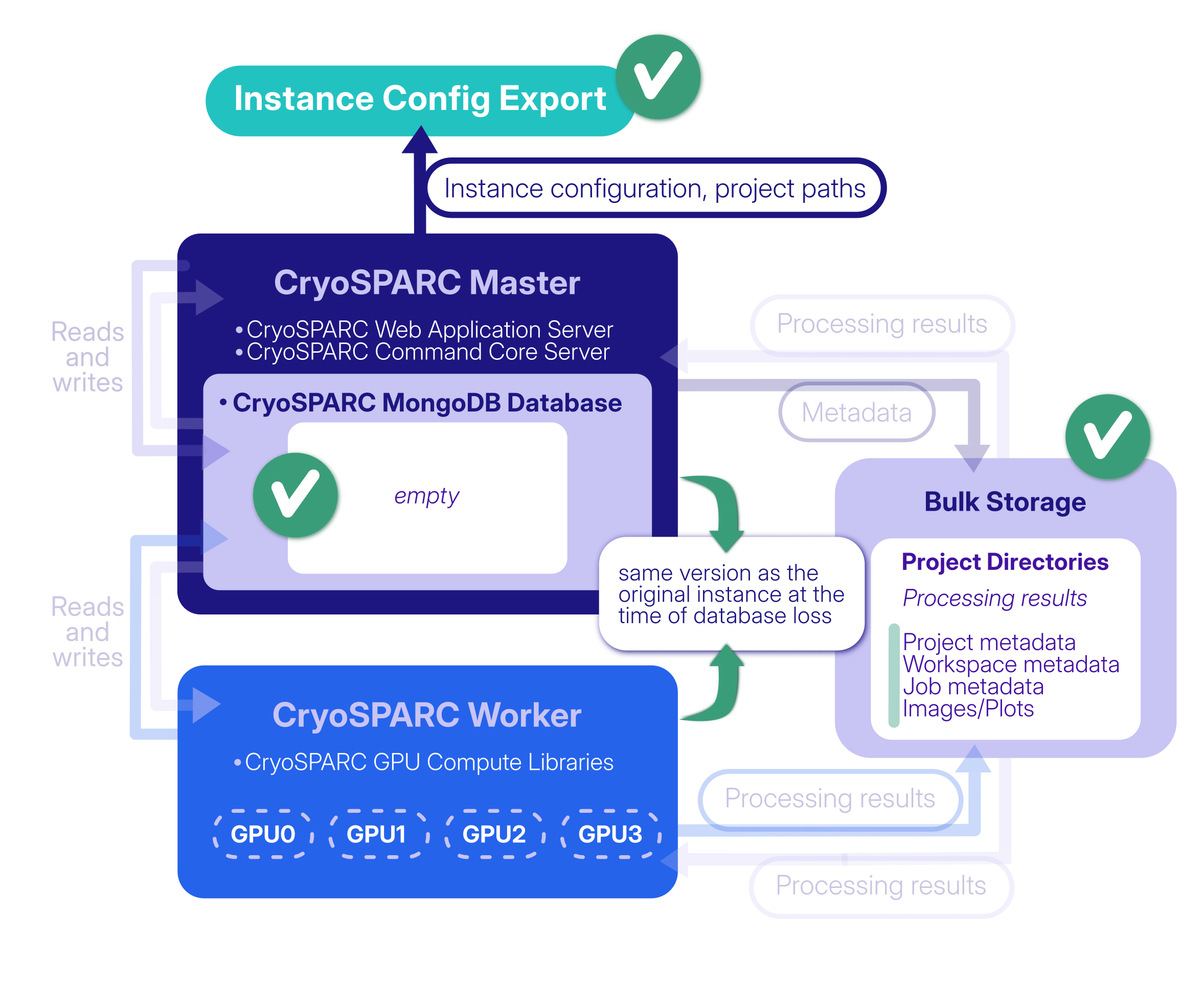
Following the steps outlined in the Guide, cryosparcm recover restores the instance configuration from the exported file and automatically reattaches the projects that were attached when the export was created. Projects that could not be recovered automatically (for example, project directories are unavailable) can be manually attached once the recovery process is complete. Projects that are reattached during instance recovery automatically retain their original Project UID specifiers (for example, P1, P2, etc.).
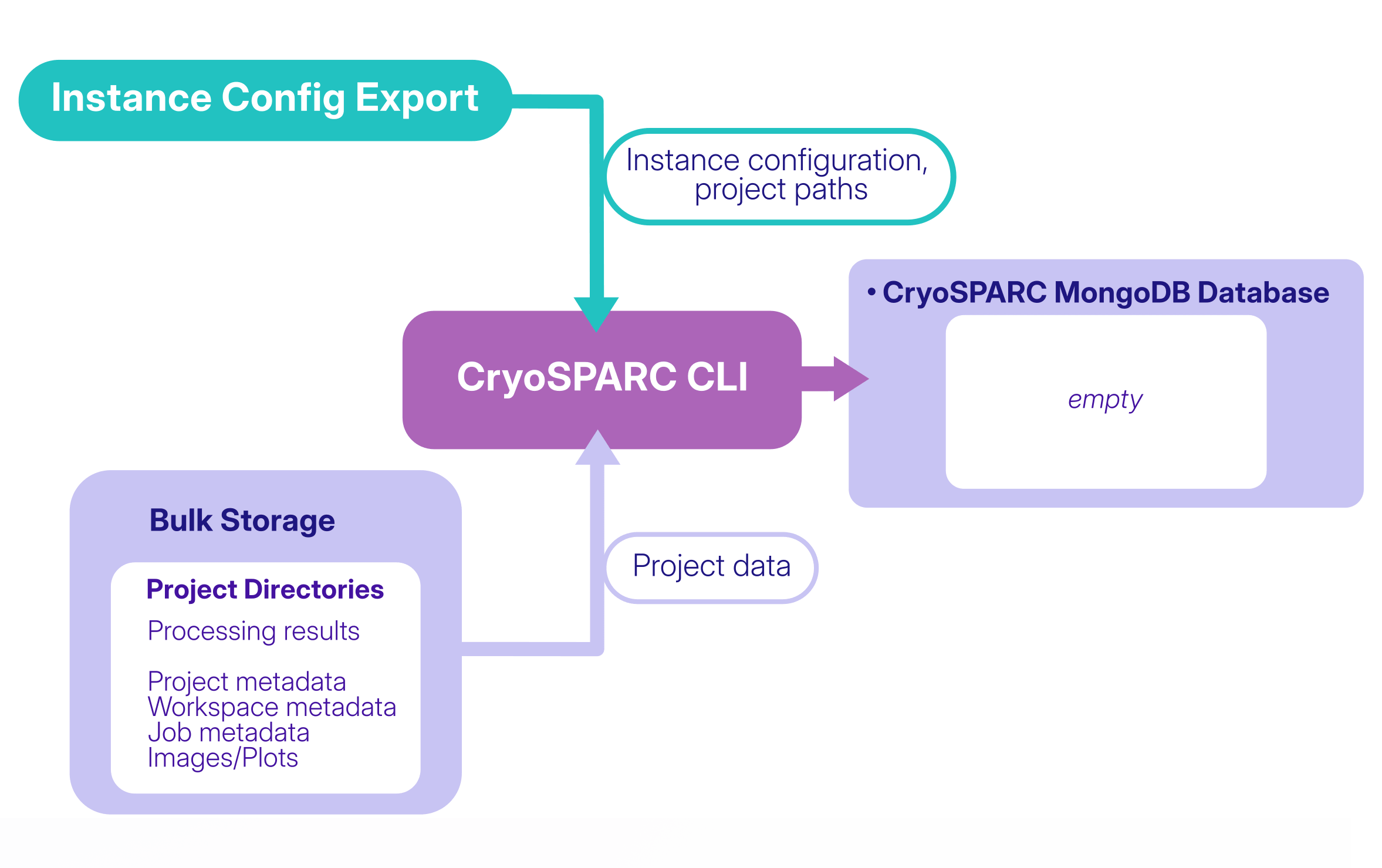
Thanks to the hourly generation of the instance configuration export, recovering from a lost or corrupted database can now be simpler and less time-consuming. If information was added or changed between the most recent export and database loss, manual recovery steps can still be used where needed: for example, if a new project was created since the last instance configuration export, it will not be reattached automatically during instance recovery but it can be manually reattached.
Note that the same recovery workflow can also be useful in some cases when migrating a CryoSPARC instance to new hardware. For example, a migration may be required when upgrading the underlying system or hardware, or when moving an entire CryoSPARC instance and its data to a new machine. In these cases, Instance Recovery provides a way to reconstruct the instance on the new system using the instance configuration export and existing project directories.
Read the Guide: Instance Recovery (v5.0+) to learn more about the new feature and find detailed instructions for implementing it.
For more information regarding the CryoSPARC v5.0 release, visit the changelog and the related blog post.